


















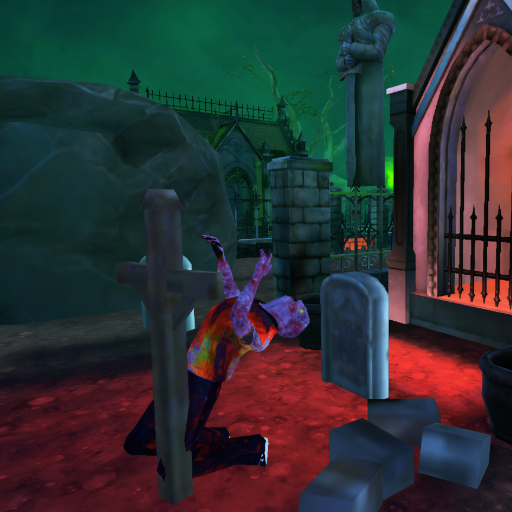




Undead Walking 3D is a first-person 3D zombie survival game where you fight through a 13-level campaign filled with undead enemies. Your journey takes you through different environments, including ruined city areas, flooded sewers, and an airport overrun by zombies.
You begin your fight with a bow and gain access to additional weapons as you progress. Ammunition is limited, so accurate shooting is important. Instead of firing without thinking about your remaining ammo, choose your targets carefully and aim for effective shots whenever possible.
Headshots are especially useful when fighting zombies, rewarding accurate aim while helping you use your available ammunition more effectively. As you advance through the campaign, stronger encounters and boss battles increase the challenge.
The combination of multiple environments, weapon progression, limited ammunition, zombies, and boss encounters gives Undead Walking 3D more structure than a simple endless zombie survival game. Your objective is to keep progressing through the levels while surviving the undead standing in your way.
You can play Undead Walking 3D directly in your browser on Freecase24 without installing the game. Use the game's mouse or touch controls to interact, aim, and fight your way through the zombie-filled campaign.
How to Play Undead Walking 3D
Your objective is to survive the zombie outbreak and progress through all 13 levels. Each stage puts you against undead enemies that must be dealt with before you can continue your journey.
You start with a bow, so careful aiming is important from the beginning. As you progress through the game, you can gain access to additional weapons that give you more options when dealing with the undead.
Ammunition is limited, making accuracy an important part of survival. Avoid wasting shots when a zombie is difficult to hit and try to line up accurate attacks whenever possible.
Aim for headshots when you have a clear opportunity. Accurate shots can help you deal with zombies efficiently while preserving valuable ammunition for the enemies and boss encounters ahead.
Continue through the different environments, survive the undead, improve your available weapons, and prepare for the tougher encounters that appear as you advance through the campaign.
Undead Walking 3D Controls
Mouse: Use the mouse to interact with and control the game on desktop.
Mouse Click: Click to perform the relevant shooting or gameplay action.
Mobile: Tap and use the touch screen to control the game on compatible mobile devices.
Undead Walking 3D Tips and Strategy
Make every shot count: Ammunition is limited, so avoid wasting shots. Take an extra moment to line up an accurate attack when the situation allows it.
Aim for headshots: Accurate headshots can help you deal with zombies efficiently. Improving your aim is especially valuable when you need to conserve ammunition.
Don't fire unnecessarily: Shooting without a clear target can leave you short on ammunition later. Wait until you have a useful shot instead of attacking continuously.
Pay attention to your surroundings: The campaign takes place across different environments. Keep track of where enemies are appearing and avoid focusing on only one part of the scene.
Learn how each weapon works: You begin with a bow and gain access to other weapons as you progress. Take time to understand the weapons available to you instead of using every one in exactly the same way.
Prepare for boss encounters: Boss battles provide tougher challenges than ordinary zombie encounters. Preserve your resources where possible and focus on avoiding unnecessary mistakes before these fights.
Stay accurate under pressure: Larger groups of zombies can encourage rushed shooting, but uncontrolled attacks can waste ammunition. Try to maintain your accuracy even when several enemies are threatening you.
What Makes Undead Walking 3D Different?
Undead Walking 3D combines zombie shooting with a structured 13-level campaign rather than relying only on an endless survival format. Progress takes you through different locations, including ruined urban environments, flooded sewers, and an airport filled with undead threats.
Weapon progression adds another layer to the campaign. Starting with a bow and gaining access to additional weapons gives the player more combat options as the challenge develops.
Limited ammunition also makes accuracy meaningful. Headshots and careful shot selection can help you preserve resources instead of simply firing continuously at every enemy.
Boss encounters provide additional challenges during the campaign, while the combination of zombies, different environments, weapon progression, and resource management keeps the focus on surviving and advancing through all 13 levels.
Undead Walking 3D FAQ
What is Undead Walking 3D?
Undead Walking 3D is a 3D zombie survival and shooting game where you fight undead enemies while progressing through a 13-level campaign.
How many levels are in Undead Walking 3D?
Undead Walking 3D features 13 levels with different environments and increasingly challenging zombie encounters.
Which weapon do you start with?
You begin the game with a bow. Additional weapons become available as you progress through the campaign.
Is ammunition limited in Undead Walking 3D?
Yes. Ammunition is limited, so careful aiming and avoiding unnecessary shots are important parts of surviving the game.
Are headshots useful?
Yes. Headshots reward accurate aiming and can help you deal with zombies more efficiently while conserving ammunition.
Does Undead Walking 3D have boss fights?
Yes. The campaign includes boss encounters that provide tougher challenges alongside the regular zombie battles.
What environments are in Undead Walking 3D?
The campaign takes you through several zombie-filled environments, including ruined city areas, flooded sewers, and an airport.
Can I unlock additional weapons?
Yes. You start with a bow and gain access to additional weapons as you advance through the game.
Can I play Undead Walking 3D on mobile?
Yes. The game supports touch controls on compatible mobile devices.
Do I need to download Undead Walking 3D?
No. Undead Walking 3D can be played directly in your browser on Freecase24 without installing the game.
About this game
| Details | Info |
|---|---|
| Controls | Mouse click or tap to play |
| Platform | Browser (HTML5) |
| Supported devices | Desktop, Phone & Tablet |
| Developer | Mapi Games |
| Release Date | 31.07.2026 |
| Latest update | 31.07.2026 |
| Rating | 4.2 (47,578 votes) |
Trending Games To Play On Freecase24
Apex Racer, Mega Casino Mania, Hydro Racing 3D, Sprunki Run, Jail Drop 3D, Mini Tennis 3D