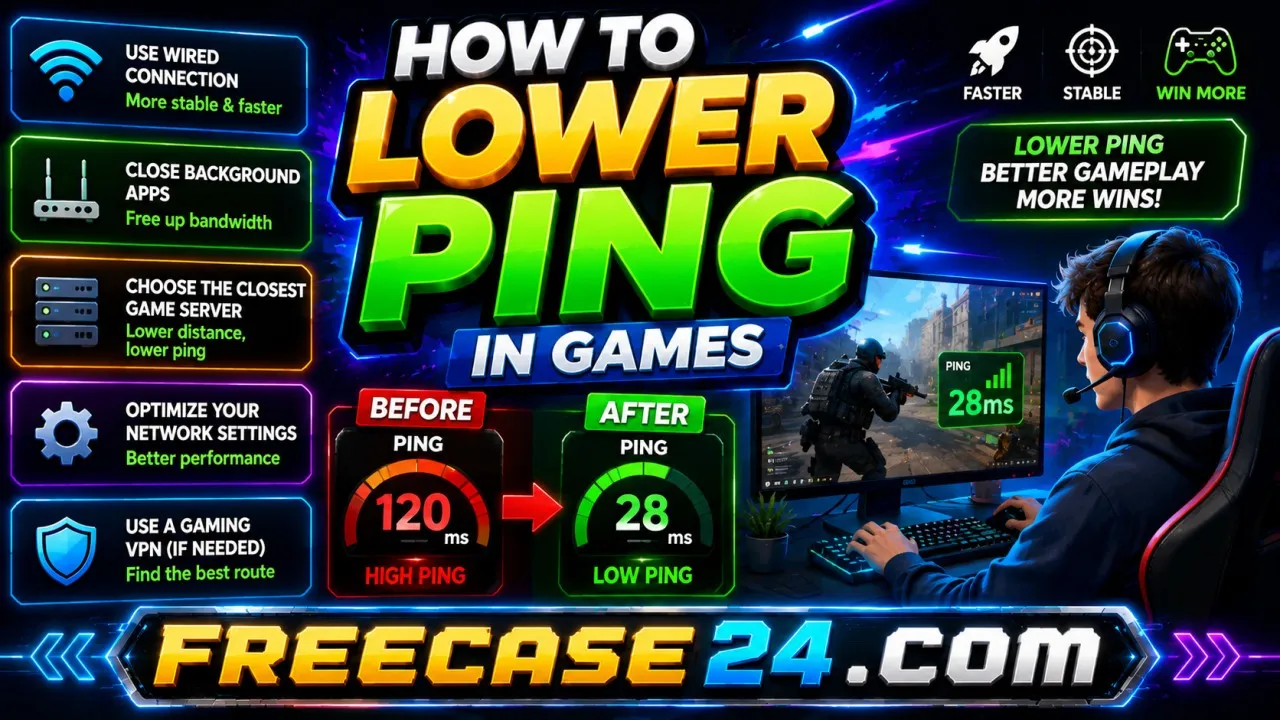
How to Lower Ping in Games: Easy Tips for Better Gameplay

Post Object ( [id] => 205 [created_date] => 1784505600 [slug] => how-to-lower-ping-in-games [thumbnail_url] => /files/images/how to lower ping in games.webp [title] => How to Lower Ping in Games: Easy Tips for Better Gameplay [content] =>

Every gamer has experienced it you make the right move at exactly the right moment, and nothing happens. A second later, the game catches up and shows you dying anyway. That delay between your input and the game's response is ping, and understanding how to lower ping in games is one of the most practically useful things any online gamer can learn. It does not require expensive equipment or technical expertise. It requires understanding what causes high ping and making a handful of changes that collectively produce a noticeably smoother experience.

This guide covers everything honestly what ping actually is, what causes it to spike, and the specific steps that reliably bring it down across every type of online game.

What Ping Actually Is And Why It Matters ?

Ping is measured in milliseconds and represents the time it takes for a signal to travel from your device to the game server and back again. A ping of 20ms means that round trip takes 20 milliseconds. A ping of 200ms means it takes 200 milliseconds and in a fast-paced game, that difference is the gap between your input registering and your opponent already being somewhere else.

What different ping levels feel like in practice:

  • Under 30ms effectively invisible lag, the game responds as fast as your reflexes.
  • 30ms to 60ms smooth and playable, most players notice nothing at this range.
  • 60ms to 100ms acceptable for casual play, competitive players start feeling the edge.
  • 100ms to 150ms noticeable delay, particularly in reaction-based games.
  • 150ms and above genuinely disruptive, aiming and timing both become unreliable.

If you want to understand how to lower ping in games effectively, the starting point is always measuring where yours currently sits and then identifying which of the causes below is responsible for it being higher than it should be.

The Real Causes of High Ping

Before fixing anything, it helps to understand what is actually creating the problem. High ping in online games almost always comes from one of these sources:​

  • Distance from the game server the further data has to travel physically, the higher your baseline ping will be regardless of connection speed.
  • Wi-Fi interference wireless signals compete with other devices, walls, and interference sources in ways that introduce packet loss and inconsistency.
  • Background applications using bandwidth video streaming, downloads, cloud backups, and video calls all consume the same connection your game depends on.
  • ISP routing issues your internet provider routes data through various nodes before it reaches the game server, and inefficient routing adds latency that has nothing to do with your home setup.
  • Overloaded game servers during peak hours, popular game servers handle more connections simultaneously, which increases response times across all connected players.
  • Outdated network hardware routers and modems that are several years old handle data packets less efficiently than modern equivalents.

Understanding which of these applies to your situation determines which fixes will actually help and which are irrelevant in your specific case.

How to Lower Ping in Games The Fixes That Actually Work ?

Switch From Wi-Fi to a Wired Connection

This single change produces the most consistent improvement of anything on this list. Wi Fi is convenient but fundamentally less stable than a wired ethernet connection. Wireless signals degrade through walls, compete with neighbouring networks, and introduce variability in packet delivery that shows up directly as ping spikes during gameplay.

An ethernet cable from your router to your gaming device eliminates that variability entirely. If your router is in a different room, a powerline adapter which sends the network signal through your home's electrical wiring provides a wired connection without running a cable through the house.

For browser-based games on platforms like Freecase24 this matters just as much as it does for dedicated gaming clients. Games like Minicraft Bedwars involve real time multiplayer interactions where a stable connection directly affects how accurately your actions register against other players.

Close Background Applications Before Playing

Every application running on your device that uses the internet is competing with your game for bandwidth. The effect this has on ping is often underestimated a single active video stream or a file syncing to cloud storage can spike ping by 50ms or more during the transfer bursts.

Before starting any online session, close or pause:

  • Video streaming services Netflix, YouTube, Prime Video.
  • Cloud storage syncing Google Drive, Dropbox, OneDrive.
  • Software update processes Windows Update, app store updates.
  • File download managers or torrent clients.
  • Video calling applications Zoom, Teams, Google Meet.
  • Browser tabs with auto-playing video content.

This is one of the easiest and most overlooked ways to improve ping, and it costs nothing to implement.

Connect to the Closest Available Game Server

Most online games let you select your server region manually, or they auto-select based on your location. If auto selection is choosing a distant server particularly if you are close to a regional boundary manually selecting the nearest server can drop ping significantly.

For browser games on Freecase24 including titles like Weapon Run and Ultra Shot the content delivery infrastructure handles most of this automatically. But for multiplayer-heavy games, checking your server selection is always worth the thirty seconds it takes.

Restart Your Router Regularly

Routers accumulate memory usage over time as they handle increasing numbers of connections and routing decisions. A router that has been running for several weeks without a restart often handles packets less efficiently than one that was freshly restarted.

Restarting your router once a week takes thirty seconds and frequently produces a meaningful improvement in baseline ping. If you notice your ping is consistently higher at certain times of day, a router restart before your gaming session is the first thing to try.

Update Your Network Adapter Drivers

Outdated drivers for your network adapter can cause inefficiency in how your device handles packets. On Windows, go to Device Manager, find your network adapter, right click and select Update Driver. This is a five-minute process that is worth doing if you have not checked your drivers recently.

Use a Gaming VPN Selectively

This one requires honest qualification. A VPN does not automatically lower ping in most cases it actually increases it slightly because data has to travel through an additional server. However, in specific situations where your ISP is routing traffic inefficiently to a particular game server, a gaming VPN can find a shorter or less congested path and produce a genuine improvement.

VPNs are worth testing when you notice your ping to a specific game is significantly higher than expected given your physical location. Try a gaming VPN with a server close to the game server and compare the results if it helps, use it for that specific game. If it does not, the VPN is adding latency rather than reducing it.

How to Lower Ping in Games on Mobile ?

Mobile gaming introduces additional variables that desktop players do not face. If you are playing on a phone or tablet including browser games on Freecase24 the following apply directly:​

  • Use Wi-Fi over mobile data whenever possible cellular connections introduce more variability than home broadband.
  • Stay close to your router signal strength drops with distance and through walls, which shows up as higher ping.
  • Avoid playing during peak network hours mobile networks become congested in evenings, particularly in densely populated areas.
  • Close background apps on your phone mobile operating systems allow background apps to use data, which affects your gaming connection exactly as desktop background applications do.
  • Disable automatic updates while gaming app store updates consume significant bandwidth in short bursts.

Ping and Browser Games What You Need to Know

Browser-based games handle latency differently from traditional client-based games, but ping still matters. For real time multiplayer titles and competitive games, the same principles apply.

Jungle Jeep Simulator on Freecase24 is a physics driven game where responsiveness matters the jeep's reaction to your inputs is directly affected by connection quality, particularly on mobile. Similarly, Hero Jump City Nights demands precise timing that benefits from a low-latency connection where your jump input registers immediately rather than after a brief delay.

The practical advice for browser gaming on Freecase24 is straightforward close unnecessary browser tabs, use a wired connection where possible, and avoid playing on Wi-Fi from a distant room when precise timing is required.

Quick Reference How to Lower Ping in Games ?

Here is the complete list of actions ranked by how reliably they produce improvement:​

  • Switch to ethernet highest impact, works every time for Wi-Fi users.
  • Close background applications high impact, takes thirty seconds.
  • Restart your router medium impact, particularly effective if it has been running for weeks.
  • Select the closest server high impact when available in the game settings.
  • Update network drivers medium impact, worth checking if nothing else helps.
  • Upgrade your router high impact if your current hardware is more than four years old.
  • Test a gaming VPN situational, useful only when ISP routing is the specific issue.

Final Thought on How to Lower Ping in Games

High ping is a solvable problem in the vast majority of cases. The causes are well understood, the fixes are accessible, and the improvement is measurable. Working through the steps above starting with the wired connection and background application fixes will produce a noticeable difference for most players without spending anything.

Whether you are competing in a multiplayer browser game on Freecase24 grinding through a competitive title, or simply trying to make your casual gaming sessions feel smoother, understanding how to lower ping in games gives you direct control over an experience that most players simply accept as unchangeable.

It is not unchangeable. It is fixable and now you have the steps to fix it.

[fields] => [extra_fields] => {"post-meta-title":"How to Lower Ping in Games: Easy Tips for Better Gameplay","post-meta-description":"How to Lower Ping in Games with simple tips to reduce lag, improve connection stability, and enjoy smoother online gameplay across all devices.","post-meta-keyword":"how to lower ping in games","source_text":"","source_link":"","faq":""} )
How to Lower Ping in Games: Easy Tips for Better Gameplay

Every gamer has experienced it you make the right move at exactly the right moment, and nothing happens. A second later, the game catches up and shows you dying anyway. That delay between your input and the game's response is ping, and understanding how to lower ping in games is one of the most practically useful things any online gamer can learn. It does not require expensive equipment or technical expertise. It requires understanding what causes high ping and making a handful of changes that collectively produce a noticeably smoother experience.

This guide covers everything honestly what ping actually is, what causes it to spike, and the specific steps that reliably bring it down across every type of online game.

What Ping Actually Is And Why It Matters ?

Ping is measured in milliseconds and represents the time it takes for a signal to travel from your device to the game server and back again. A ping of 20ms means that round trip takes 20 milliseconds. A ping of 200ms means it takes 200 milliseconds and in a fast-paced game, that difference is the gap between your input registering and your opponent already being somewhere else.

What different ping levels feel like in practice:

  • Under 30ms effectively invisible lag, the game responds as fast as your reflexes.
  • 30ms to 60ms smooth and playable, most players notice nothing at this range.
  • 60ms to 100ms acceptable for casual play, competitive players start feeling the edge.
  • 100ms to 150ms noticeable delay, particularly in reaction-based games.
  • 150ms and above genuinely disruptive, aiming and timing both become unreliable.

If you want to understand how to lower ping in games effectively, the starting point is always measuring where yours currently sits and then identifying which of the causes below is responsible for it being higher than it should be.

The Real Causes of High Ping

Before fixing anything, it helps to understand what is actually creating the problem. High ping in online games almost always comes from one of these sources:​

  • Distance from the game server the further data has to travel physically, the higher your baseline ping will be regardless of connection speed.
  • Wi-Fi interference wireless signals compete with other devices, walls, and interference sources in ways that introduce packet loss and inconsistency.
  • Background applications using bandwidth video streaming, downloads, cloud backups, and video calls all consume the same connection your game depends on.
  • ISP routing issues your internet provider routes data through various nodes before it reaches the game server, and inefficient routing adds latency that has nothing to do with your home setup.
  • Overloaded game servers during peak hours, popular game servers handle more connections simultaneously, which increases response times across all connected players.
  • Outdated network hardware routers and modems that are several years old handle data packets less efficiently than modern equivalents.

Understanding which of these applies to your situation determines which fixes will actually help and which are irrelevant in your specific case.

How to Lower Ping in Games The Fixes That Actually Work ?

Switch From Wi-Fi to a Wired Connection

This single change produces the most consistent improvement of anything on this list. Wi Fi is convenient but fundamentally less stable than a wired ethernet connection. Wireless signals degrade through walls, compete with neighbouring networks, and introduce variability in packet delivery that shows up directly as ping spikes during gameplay.

An ethernet cable from your router to your gaming device eliminates that variability entirely. If your router is in a different room, a powerline adapter which sends the network signal through your home's electrical wiring provides a wired connection without running a cable through the house.

For browser-based games on platforms like Freecase24 this matters just as much as it does for dedicated gaming clients. Games like Minicraft Bedwars involve real time multiplayer interactions where a stable connection directly affects how accurately your actions register against other players.

Close Background Applications Before Playing

Every application running on your device that uses the internet is competing with your game for bandwidth. The effect this has on ping is often underestimated a single active video stream or a file syncing to cloud storage can spike ping by 50ms or more during the transfer bursts.

Before starting any online session, close or pause:

  • Video streaming services Netflix, YouTube, Prime Video.
  • Cloud storage syncing Google Drive, Dropbox, OneDrive.
  • Software update processes Windows Update, app store updates.
  • File download managers or torrent clients.
  • Video calling applications Zoom, Teams, Google Meet.
  • Browser tabs with auto-playing video content.

This is one of the easiest and most overlooked ways to improve ping, and it costs nothing to implement.

Connect to the Closest Available Game Server

Most online games let you select your server region manually, or they auto-select based on your location. If auto selection is choosing a distant server particularly if you are close to a regional boundary manually selecting the nearest server can drop ping significantly.

For browser games on Freecase24 including titles like Weapon Run and Ultra Shot the content delivery infrastructure handles most of this automatically. But for multiplayer-heavy games, checking your server selection is always worth the thirty seconds it takes.

Restart Your Router Regularly

Routers accumulate memory usage over time as they handle increasing numbers of connections and routing decisions. A router that has been running for several weeks without a restart often handles packets less efficiently than one that was freshly restarted.

Restarting your router once a week takes thirty seconds and frequently produces a meaningful improvement in baseline ping. If you notice your ping is consistently higher at certain times of day, a router restart before your gaming session is the first thing to try.

Update Your Network Adapter Drivers

Outdated drivers for your network adapter can cause inefficiency in how your device handles packets. On Windows, go to Device Manager, find your network adapter, right click and select Update Driver. This is a five-minute process that is worth doing if you have not checked your drivers recently.

Use a Gaming VPN Selectively

This one requires honest qualification. A VPN does not automatically lower ping in most cases it actually increases it slightly because data has to travel through an additional server. However, in specific situations where your ISP is routing traffic inefficiently to a particular game server, a gaming VPN can find a shorter or less congested path and produce a genuine improvement.

VPNs are worth testing when you notice your ping to a specific game is significantly higher than expected given your physical location. Try a gaming VPN with a server close to the game server and compare the results if it helps, use it for that specific game. If it does not, the VPN is adding latency rather than reducing it.

How to Lower Ping in Games on Mobile ?

Mobile gaming introduces additional variables that desktop players do not face. If you are playing on a phone or tablet including browser games on Freecase24 the following apply directly:​

  • Use Wi-Fi over mobile data whenever possible cellular connections introduce more variability than home broadband.
  • Stay close to your router signal strength drops with distance and through walls, which shows up as higher ping.
  • Avoid playing during peak network hours mobile networks become congested in evenings, particularly in densely populated areas.
  • Close background apps on your phone mobile operating systems allow background apps to use data, which affects your gaming connection exactly as desktop background applications do.
  • Disable automatic updates while gaming app store updates consume significant bandwidth in short bursts.

Ping and Browser Games What You Need to Know

Browser-based games handle latency differently from traditional client-based games, but ping still matters. For real time multiplayer titles and competitive games, the same principles apply.

Jungle Jeep Simulator on Freecase24 is a physics driven game where responsiveness matters the jeep's reaction to your inputs is directly affected by connection quality, particularly on mobile. Similarly, Hero Jump City Nights demands precise timing that benefits from a low-latency connection where your jump input registers immediately rather than after a brief delay.

The practical advice for browser gaming on Freecase24 is straightforward close unnecessary browser tabs, use a wired connection where possible, and avoid playing on Wi-Fi from a distant room when precise timing is required.

Quick Reference How to Lower Ping in Games ?

Here is the complete list of actions ranked by how reliably they produce improvement:​

  • Switch to ethernet highest impact, works every time for Wi-Fi users.
  • Close background applications high impact, takes thirty seconds.
  • Restart your router medium impact, particularly effective if it has been running for weeks.
  • Select the closest server high impact when available in the game settings.
  • Update network drivers medium impact, worth checking if nothing else helps.
  • Upgrade your router high impact if your current hardware is more than four years old.
  • Test a gaming VPN situational, useful only when ISP routing is the specific issue.

Final Thought on How to Lower Ping in Games

High ping is a solvable problem in the vast majority of cases. The causes are well understood, the fixes are accessible, and the improvement is measurable. Working through the steps above starting with the wired connection and background application fixes will produce a noticeable difference for most players without spending anything.

Whether you are competing in a multiplayer browser game on Freecase24 grinding through a competitive title, or simply trying to make your casual gaming sessions feel smoother, understanding how to lower ping in games gives you direct control over an experience that most players simply accept as unchangeable.

It is not unchangeable. It is fixable and now you have the steps to fix it.